Using SPICE Discrete Component Models (.MODEL Directive)
What is the SPICE .MODEL Directive?
The SPICE .MODEL directive allows you to specify the parameters necessary to accurately model simple discrete semiconductor devices. This feature allows you to tune the parameters of a device model that’s intrinsically understood by SPICE, such as NPN/PNP transistors, diodes, and various MOSFETs.
For example, below is a model of the popular 2N2222 NPN transistor.
.model 2N2222A NPN (Is=14.34f Xti=3 Eg=1.11 Vaf=74.03 Bf=255.9 Ne=1.307
+ Ise=14.34f Ikf=.2847 Xtb=1.5 Br=6.092 Nc=2 Isc=0 Ikr=0 Rc=1 Cjc=7.306p
+ Mjc=.3416 Vjc=.75 Fc=.5 Cje=22.01p Mje=.377 Vje=.75 Tr=46.91n Tf=411.1p
+ Itf=.6Vtf=1.7 Xtf=3 Rb=10 Vceo=40)
Models like these are commonly distributed by electronics manufacturers. Read on to learn how to use them in QUCS-S simulations.
Tip
A model for the component you want to use may already exist in the out-of-the-box library! QUCS-S ships with a robust library of models for common parts - check it out before importing additional models.
See the documentation section on Libraries for more information on this part of QUCS-S.
Importing with “Populate Parameters from SPICE File” (recommended)
Warning
This section depends on a feature that was not added until QUCS-S v24.3.0 (released July 2024).
If you are using a QUCS-S version older than v24.3.0, this feature is not available! You will need to use the more manual method described in the next section.
For many of the blue Universal Components (see here if you’re not sure what this means), a SPICE model can be directly imported after placing the component on your schematic. To do this, double-click on the component to open the Edit Properties dialog.
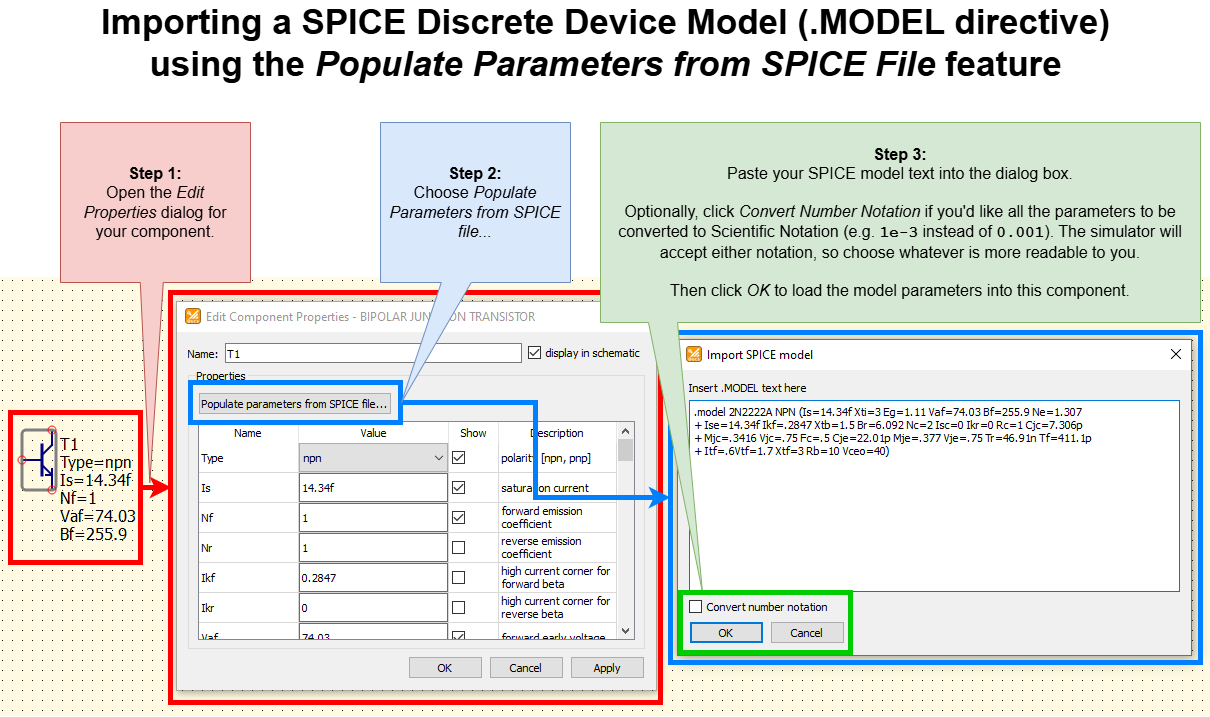
Annotated screenshots showing how to import a SPICE discrete device model (.MODEL directive) using the new Populate Parameters from SPICE File feature (available in QUCS-S v24.3.0 and later).
This specific example shows how to import the model for the popular 2N2222A for an NPN transistor component.
Applicable Components
Out of all the blue Universal Components in QUCS-S, only the semiconductor devices include the Populate Parameters from SPICE File feature. At the time of this writing (July 2025), the latest release is QUCS-S v25.1.2, so the following components include this feature:
Diodenpn transistor(with and without substrate connection)pnp transistor(with and without substrate connection)n-JFET(with and without substrate connection)p-JFET(with and without substrate connection)n-MOSFET(with and without substrate connection)p-MOSFET(with and without substrate connection)depletion MOSFET(with and without substrate connection)
All these components are accessible via the Nonlinear Components section of the Components Tab.
Importing with Manual SPICE Netlist Addition
Let’s consider the example of the popular 2N2222A NPN transistor. The SPICE model for this device is shown in an earlier section.
You could manually copy and paste each parameter from the SPICE .MODEL text into the appropriate place in the QUCS-S component properties. Obviously, this is tedious and error-prone. A more desirable method might be to use special QUCS-S components that can inject additional text into the SPICE Netlist. Two such methods are described in the following sections.
Embedding a Model into a Schematic with .MODEL Section
Instead of manually copying/pasting each parameter, you can use the .MODEL Section from the SPICE Netlist Sections category of components. Placing this on your schematic allows you to define an arbitrary SPICE model for a given device ID.
To use this method, place a .MODEL Section on your schematic, and populate it with the text from your model, as shown below.

Example of the SPICE .MODEL Section component, placed on the schematic with the model text for the 2N2222A transistor.
Now, to use the model, you will need a special transistor component that supports the full SPICE specification (color-coded red). The blue Universal components will NOT work here. See the Interface Overview section if you’re not familiar with this distinction.
We place a red transistor (Q NPN BJT) on the diagram and enter the model name 2N2222A into its properties. This transistor could be found in microelectronics group on the left panel. The screenshot shows a test circuit with such a transistor, which simulates a family of output I-V characteristics.

Example of the SPICE .MODEL Section component being used in a schematic. Note that the transistor Q1 references the model ID 2N2222A - this is what links the schematic component to the SPICE .MODEL text.
Referencing an External File with .INCLUDE or .LIB
If you have many models to import, your schematic could quickly get cluttered with SPICE .MODEL Section components. To avoid this, you can reference an external SPICE file with one of two methods:
.LIB Section (Recommended): This inserts a SPICE
.LIBdirective, which causes SPICE to ONLY parse the.MODELdirectives in the referenced text file (other directives will be ignored). This is recommended since it limits the possibility for unintended modifications to your circuit with other SPICE directives..INCLUDE Section: This inserts a SPICE
.INCLUDEdirective, which respects the full set of SPICE directives in the referenced file. This will work, but risks confusing behavior if the referenced file contains additional SPICE directives that modify the behavior of your circuit.
Whichever method you choose to use, place the text file containing your model in $HOME/QucsWorkspace/user_lib (see QUCS-S Home Directory for more details on this location). Then, place either a .INCLUDE Section or .LIB Section on your schematic, and set it up to reference your text file, similar to the example below.
Once you’ve done this, you can reference the .MODEL identifiers in your schematic components, just like in the 2N2222A example from the preceding section.

Example of including an external text file containing a SPICE model (in this case, using the .INCLUDE Section component). Note that the transistors J1 and J2 reference the model ID J2P307G, referring to the .MODEL text in the jm.lib file.