SPICE Model Compatibility Modes & Troubleshooting
Introduction
The netlist syntax in most modern SPICE simulators, including ngspice, is compliant with the original SPICE 3f5 standard (the last version of Berkeley SPICE, released in 1993). However, most simulators have continued adding new features on top of the original SPICE standard. For example, the popular LTspice netlist syntax supports the IF operator, while Ngspice implements a ternary operator instead.
Unfortunately, many manufacturers release device models that utilize the special features of a particular modern SPICE simulator. This gives additional flexibility and more sophisticated modeling, but it can also cause models to break when used with simulators other than the one they were originally designed for.
ngspice Compatibility Modes
To improve model compatibility, ngspice offers various “compatibility modes”, which allow netlist syntax from other simulators to operate in an ngspice simulation. Multiple different compatibility modes can be enabled at the same time, and compatibility modes can be limited in scope to certain portions of the netlist if you desire. See the Compatibility section of the ngspice manual for details.
One of the most common compatibility mode commands is to add the following to the .spiceinit file:
set ngbehavior=ltpsa
This command has 4 parts:
set ngbehavior=: Set the compatibility mode variablelt: Enable LTspice compatibility modeps: Enable PSPICE compatibility modea: Make any compatibility modes apply to the entire SPICE netlist
Please note that the compatibility modes are not 100% effective, since it’s impossible for ngspice to keep pace with commercial simulator development perfectly.
Enabling ngspice Compatibility Mode in QUCS-S
In QUCS-S, ngspice’s Compatibility Modes can be enabled for the entire QUCS-S window (with no change to your project files), or they can be enabled for a particular schematic.
Enabling Globally (Application-Wide)
If you wish, one of the ngspice Compatibility Modes can be selected from the Simulator Settings window. You can access this dialog from the top toolbar (Simulate -> Simulator Settings).
Note that with this method, only one compatibility mode can be selected at a time. If you want to enable multiple compatibility modes at a time, see the method described in the next section.
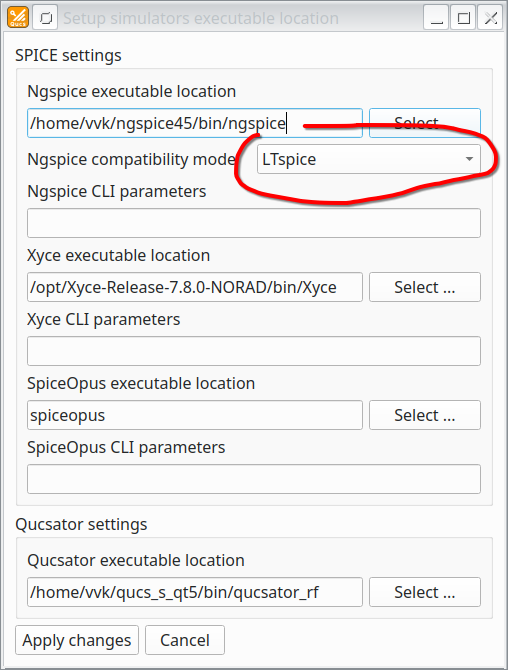
A screenshot of the Simulator Settings dialog, with the dropdown to choose an ngspice Compatibility Mode highlighted.
Enabling for a Particular Schematic
To add an ngspice compatibility mode command to a particular QUCS-S schematic, place a .spiceinit component on your schematic. This component is available from the SPICE netlist sections category of the Components Tab.
Warning
If you are using hierarchical design/QUCS-S subcircuits, place the .spiceinit component in the top-level schematic (not the lower-level subcircuit schematics) or you may get unpredictable behavior.
An example is shown below, using a model of the TDA2003 amplifier which is designed for the LTspice simulator.
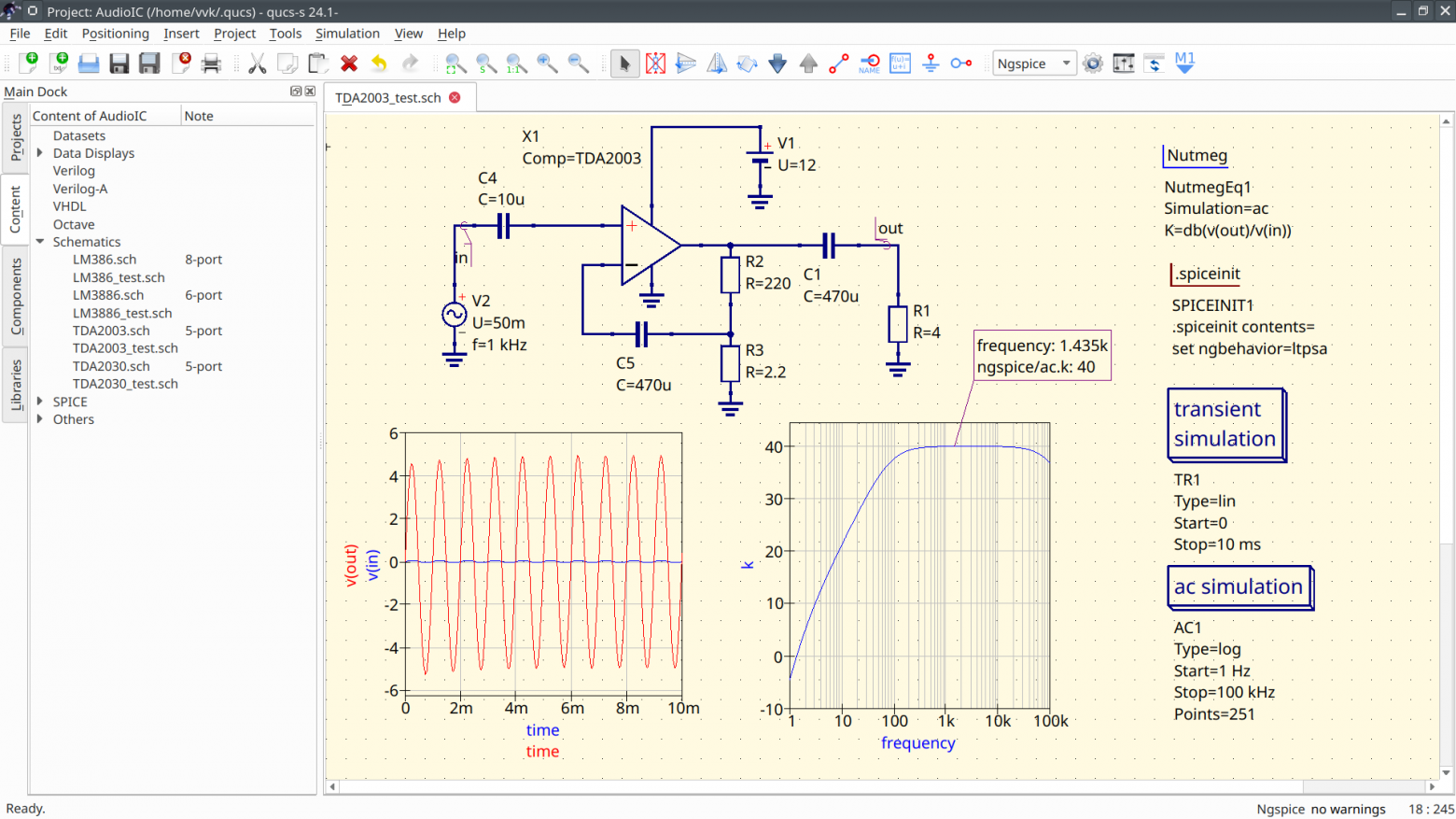
An example of a simulation with an ngspice Compatibility Mode enabled. The model for the TDA2003 amplifier is designed for the LTspice simulator, and will not work in ngspice unless Compatibility Modes are used. Note the set ngbehavior=ltpsa command (enabling both LTspice and PSPICE compatibility mode for the entire simulation netlist) in the special .spiceinit component, on the right side of the schematic.