Installing Simulation Backends
Qucs-S is able to serve as an interface around 6 different simulation backends. However, these 6 backends are not all bundled with a Qucs-S install. See the sections below for information on installing each backend.
Tip
For tips on which backend is appropriate for your use case, see Choosing a Simulation Backend.
Executable Paths and Simulator Settings
Qucs-S must be able to access the executables for each simulation backend. The Mixed-Signal Simulators (ngspice, Xyce, SpiceOpus, and QucsatorRF) are configured in a special dialog within Qucs-S, but the Digital-Only Simulators (IVerilog and GHDL) are pulled from your system’s environment variables. See the sections below for details.
Mixed-Signal Simulators
If you install a simulation backend, but Qucs-S is not showing it in the dropdown menu at the top of the window, you may need to manually point Qucs-S to the simulation executable.
You can do this using the Simulate > Simulators Settings menu and manually specifying the path, as shown in the image below.
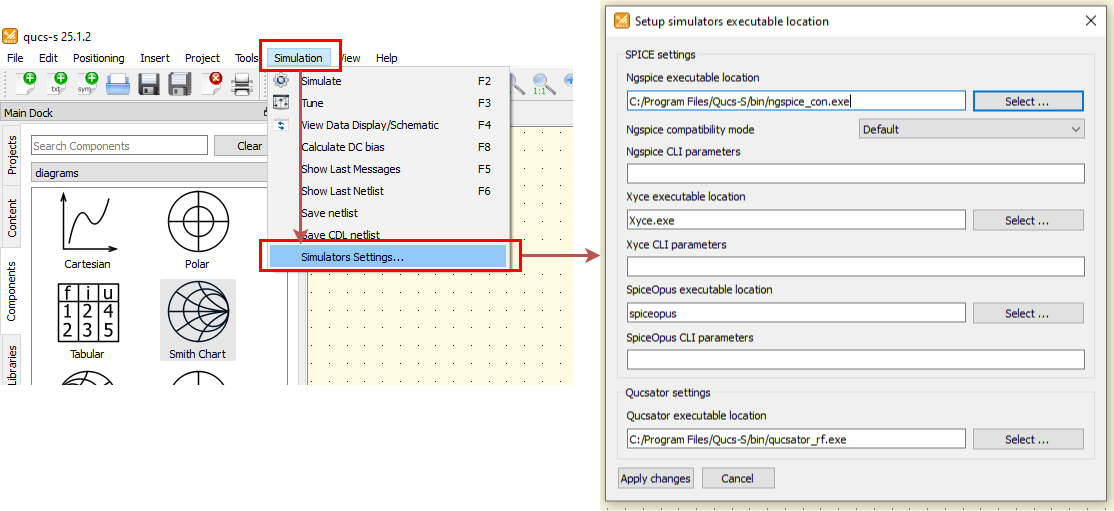
Navigating to the Simulator Settings dialog, which allows you to configure the paths to your simulation backend executables.
Digital-Only Simulators
Tip
Unfamiliar with the digital simulation capabilities of Qucs-S? Visit Digital Simulation for an overview.
The executables for the digital backends, Icarus Verilog and GHDL, are automatically located using your system’s PATH environment variable. For IVerilog, you must ensure that the iverilog executable is set up in your system’s environment variable. For GHDL, you must ensure that the ghdl executable is set up in your system’s environment variable.
Installing Mixed-Signal Backends
ngspice
Windows
ngspice is included with the Qucs-S Windows Installer, no additional installation steps are needed.
Linux
If you install Qucs-S using the provided packages with your distribution’s package manager, ngspice is typically installed as a dependency.
Linux distributions which do not receive official packages from Qucs-S, or users who opt to compile from source, may need to install ngspice manually.
MacOS
ngspice is NOT included with the .dmg’s provided on the Qucs-S GitHub, or with the homebrew packages. ngspice must be installed manually, alongside Qucs-S.
Other Platforms
Visit the ngspice project website for installation instructions.
Xyce
Xyce is not bundled with Qucs-S on any platform, it must be installed separately if desired. It is compatible with Windows (including Windows 11), numerous Linux distributions, and MacOS. For installation instructions, visit the Xyce project website.
SpiceOpus
SpiceOpus is also not bundled with Qucs-S on any platform, it must be installed separately if desired. It is currently compatible with Windows and Linux. Visit the SpiceOpus website for installation instructions.
QucsatorRF
The latest stable QucsatorRF is included with every Qucs-S release package, for all platforms. Unless you are building from source, no additional steps should be necessary to use QucsatorRF as a simulation backend.
Installing Digital-Only Backends
IVerilog
Icarus Verilog is not included with any Qucs-S package, it must be installed separately. There are a few options:
For Linux, depending on your distribution, a version of IVerilog may be available through the package manager.
For Windows, Pablo Bleyer Kocik provides Windows installers on his website. This is not officially affiliated with the Icarus Verilog project or the Qucs-S project, so if you have security concerns, it may be best to compile from the official source instead.
For other platforms, see the Icarus Verilog project website for instructions on compiling from source.
GHDL
The GHDL project provides official binaries for numerous platforms, including Windows, MacOS, and various Linux distributions, on their GitHub Releases page.