Introduction to Libraries
Purpose of Libraries
To simulate “real-world” circuit designs, it is usually necessary to incorporate models of “real-world” components. For example, you may need a model for a specific voltage regulator IC from Texas Instruments, or a specific diode from OnSemi (as opposed to a genericized/ideal model).
Bringing external SPICE models into QUCS-S simulations was discussed in earlier sections of the documentation. But for common parts used across many projects, it’s a waste of time to go back through the process of importing the model and configuring the symbol for each project. This is where Libraries come in - they allow you to build a collection of frequently-used “real-world” models, complete with all the necessary symbols to use them in QUCS-S simulations.
How Libraries Work
You can think of QUCS-S Libraries (.lib files) as “compiled” products. Creating a Library is a one-way process, just like compiling source code. If you wish to update a library, you cannot do so with just the “compiled” library file, you need the “source code”.
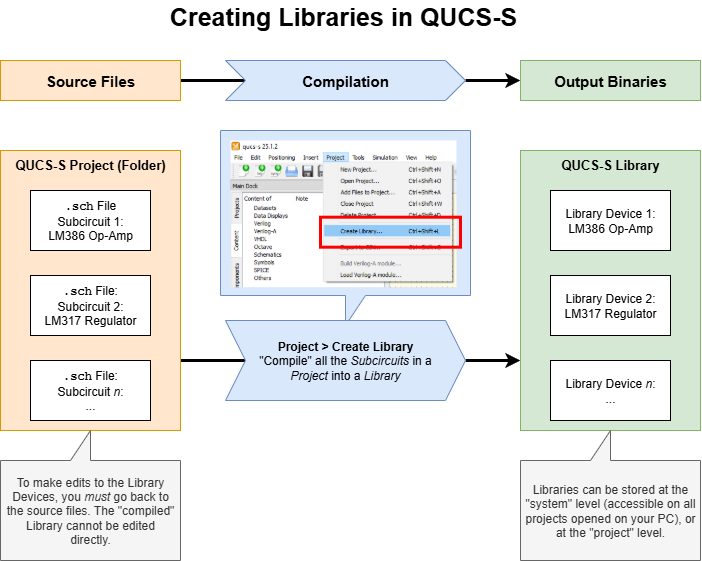
Process diagram, showing the one-way process of creating Libraries from Projects containing Subcircuits.
The input to the “compilation” (i.e. the “source code”) is a standard QUCS-S “Project”, containing multiple .sch files which are set up as Subcircuits. There should be one of these .sch files for each Device you want in your Library. The Subcircuits should have all the necessary symbols and ports configured - all the Library will do is make it easier to drop these Subcircuits into your projects.
Tip
Generally speaking, there’s no special/quick process to generate these Subcircuits for use in a Library, especially if you are importing models that utilize a SPICE .SUBCKT directive. It’s a manual process, and you cannot use the new “SPICE Library Device” component to accelerate the process.
The only time where there is a valid “shortcut” to create a Library is if you have SPICE Discrete Device models (i.e. the .MODEL data) for your devices. In that case, you can use the “Convert Data Files” utility.
You can follow this section of the Subcircuit documentation to learn how to create a subcircuit with a customized symbol based on an external SPICE model.
The output of this “compilation” process is the Library file (.lib file), which contains all the Subcircuits of the source Project.
Warning
While the Library syntax is XML-like, the exact syntax is not documented at this time, and the files are not intended to be human-editable. Attempting to manually edit a “compiled” Library file may result in unexpected behavior.