Creating Libraries from Discrete Component Data
Introduction: Data Files Converter Utility (QucsConv)
A number of useful secondary tools are bundled with QUCS-S, under the Tools menu at the top of the main window. One of these tools is a Data File Converter, also known as QucsConv.
This utility can perform a variety of common conversion tasks, and can be accessed via the GUI (Tools > Data Files Converter) or via the command line, by calling the qucsconv_rf executable.
This tool ships with the QucsatorRF simulation backend, so visit QucsatorRF’s GitHub repository to see the source code.
Converting SPICE Netlists to QUCS-S Libraries
It is possible to use the QucsConv utility to automatically create a QUCS-S Library from SPICE model data, with a major caveat: The SPICE model data must only contain .MODEL directives. It should be a single file with a .MODEL directive for each part.
Note
SPICE .MODEL directives are a common method of modeling discrete components such as BJTs, MOSFETs, and diodes in SPICE simulators.
Integrated circuits and other complex devices typically require SPICE .SUBCKT directives, which are much more complex and therefore cannot be processed by the QucsConv utility. If you need to include SPICE .SUBCKT models in a QUCS-S Library, this is still possible, you will just need to create the Library manually.
Example: LTspice BJT Library
As an example, the standard LTspice BJT library can be converted into a QUCS-S Library using the QucsConv tool.
Tip
The entire collection of standard libraries that ship with LTspice is available on ltwiki.org.
If you are experienced with LTspice and want to retain the device libraries you’re familiar with, you can use these files with the method shown in this section to create QUCS-S Libraries containing all the same components (except any components that can’t be described with a simple .MODEL directive).
To do this, follow the steps in the figure below, and click Convert. See Using Libraries for details on where to put the resulting Library (.lib) file to make it accessible in your QUCS-S projects.
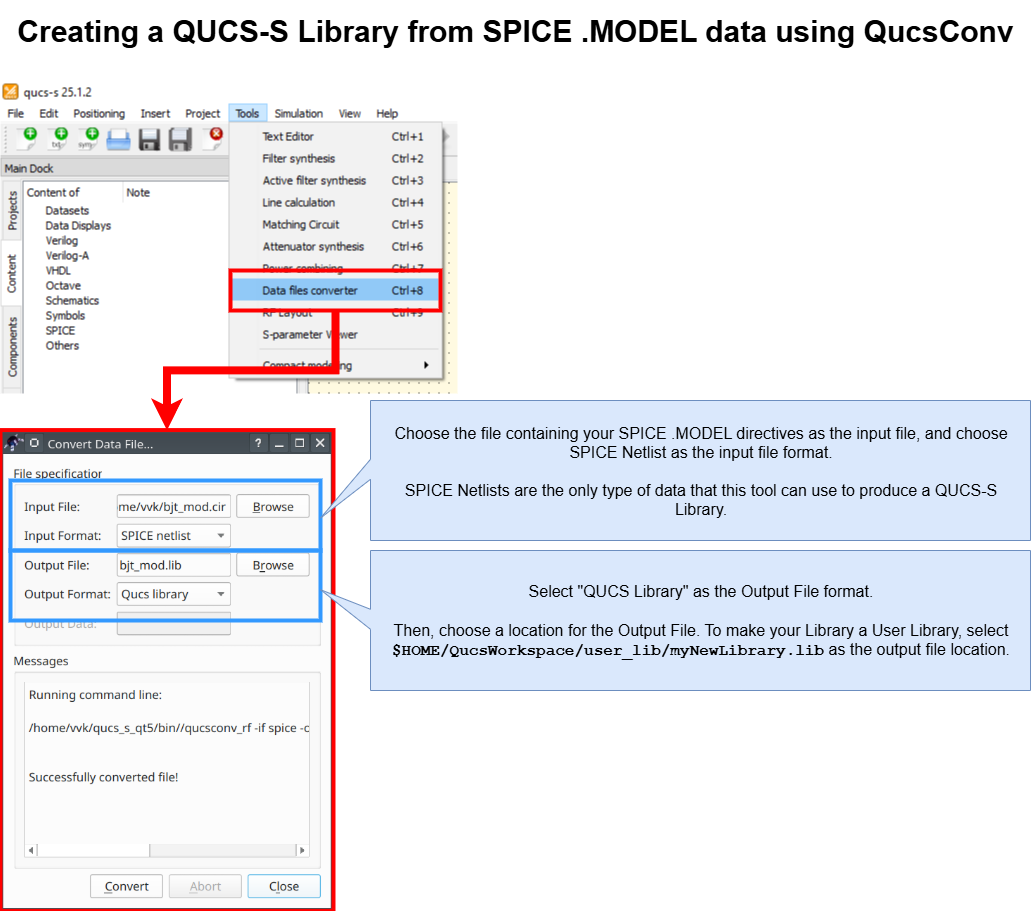
Collection of images and annotations, showing how to use the QucsConv utility (included with QUCS-S) to convert SPICE .MODEL data into a QUCS-S Library.
Warning
Remember that QUCS-S Library creation is a one-way process, much like compiling source code.
There is no way to edit the generated .lib file. If you wish to edit any portion of the library, you must make the edit to the source files and then re-create the Library file.
It is therefore recommended to keep the original SPICE .MODEL data in a safe location, in case you ever need to make an adjustment to your library.